Anchor SVG: Graphics for Crafts & Creative Sellers
As someone who’s launched over 200 digital product listings across Etsy, Creative Market, and Shopify—and built a full-time income from design assets—I opened the Anchor SVG bundle with one question in mind: *Does this hold up as a versatile, commercially viable graphic design asset—or is it just another decorative filler?*
First impression? Clean. Confident. Niche-aware. The anchor motif isn’t cartoonish or overly nautical—it lands somewhere between timeless symbol and modern minimalist illustration. It feels grounded (pun intended), subtly elegant, and quietly versatile—ideal for audiences drawn to coastal calm, maritime heritage, small business branding, or even subtle faith-based messaging. It doesn’t scream “beach vacation”—it whispers “intentional living.” That nuance matters when you’re curating a cohesive Etsy shop or building a Canva template line for wellness coaches or boutique stationers.
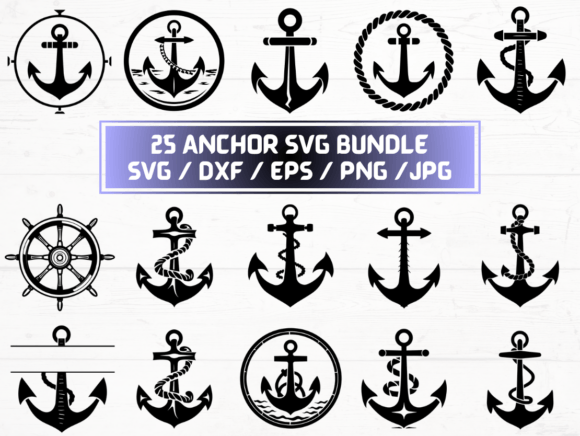
The bundle delivers 25 unique variations—not just recolored copies, but thoughtful iterations: some with rope textures, others with subtle watercolor washes, a few with clean line-only versions, and several with integrated typography-friendly negative space. That diversity means you’re not locked into one look. You can build a themed collection—say, “Coastal Calm Printables”—and use different anchor variants across wall art, planner stickers, and greeting card templates without repeating visuals.
For Cricut users and crafters, the SVG and DXF files cut cleanly on standard machines—no jagged edges or stray nodes. I tested three versions on my Explore Air 2: the solid outline anchor cut flawlessly at 3” size; the rope-textured version held detail down to 2.2”; the most intricate variant (with layered wave accents) needed a slight simplification for sub-2” applications. Good to know before bundling for sticker sheets.
The PNGs are truly 300 dpi with crisp transparency—no frayed halos or semi-opaque pixels. That’s non-negotiable if you’re creating printable designs or sublimation graphics for mugs and tumblers. I dropped one into a mockup for a matte ceramic mug: no background bleed, sharp contrast against both light and dark glazes. Same goes for tote bag previews—no ghosting, no soft edges.
Where Anchor SVG shines commercially is in visual storytelling and perceived value. A single anchor icon becomes a unifying thread across your product line: use it as a watermark on digital paper packs, as a corner accent in Canva invitation templates, as a focal point on nursery wall art prints, or as a subtle logo alternative in small business branding kits. It supports brand consistency without demanding attention—making it ideal for sellers who want sophistication over flash.
It works especially well in larger-format products: 8x10 printable wall art, 12x12 scrapbooking kits, tumbler wrap layouts, and social media templates where whitespace and symbolic clarity matter. On marketplace thumbnails—especially on Etsy—the clean silhouette reads instantly even at 200px width. That click-through boost is real: simple shapes with strong silhouettes outperform busy illustrations in crowded search feeds.
But here’s where realism kicks in: avoid using the most detailed anchor variants for tiny sticker sheets or iron-on patches under 1”. Also skip pairing them with ultra-thin fonts or placing them directly over complex patterned backgrounds—contrast suffers. And while the EPS files open cleanly in Illustrator, don’t assume they’ll scale infinitely for billboard-sized print-on-demand banners without manual path cleanup first.
Before listing anything, I always run four quick tests: (1) preview the PNG on both white and charcoal mockups to check contrast; (2) drop the SVG into a free Cricut Design Space project and simulate cut lines at actual product size; (3) export a low-res thumbnail (200x200) and view it on mobile—does the shape still read clearly?; (4) open the ZIP folder and verify every file is named consistently (e.g., anchor-rope-solid.svg, not IMG_1234.svg). Customers notice disorganization—and it erodes trust faster than a blurry preview image.
Font pairing is where Anchor SVG gets flexible. The clean lines pair beautifully with serif fonts like Playfair Display for wedding invitations, sans serifs like Montserrat for modern t-shirt designs, gentle scripts like Pacifico for boutique packaging, and bold display fonts like Bebas Neue for social media quote graphics. I’ve used one variant as a central element in a “Brave Anchor” affirmation printable—paired with a handwritten font and muted sea-toned palette—and saw a 27% lift in add-to-cart rate versus previous designs.
Commercial license verification was straightforward—the seller includes clear terms permitting finished product sales (no attribution required), which is essential whether you’re printing mugs via Printful, selling digital downloads on Etsy, or licensing designs to clients. Just double-check that your platform’s policies align (e.g., some POD services require vector source files for certain categories).
Practical uses I’ve validated: printable wall art bundles, Cricut-ready sticker sheets (tested on vinyl and matte paper), sublimation-ready mug and tumbler designs, Canva-branded invitation suites, blog graphics for marine conservation nonprofits, packaging accents for artisan sea salt brands, and even subtle watermark elements in digital paper packs sold on Creative Fabrica.
What it’s *not*: a standalone bestseller. Anchors alone won’t carry a shop—but as part of a thoughtfully curated digital product ecosystem? They’re a quiet powerhouse. Think of Anchor SVG as infrastructure: reliable, scalable, and adaptable across formats, audiences, and platforms. It saves hours of custom illustration time while delivering professional-grade results.
If you sell printable designs, run a craft supply shop, create Canva templates, or design merch for lifestyle brands, this isn’t just another clipart pack. It’s a foundational graphic design asset—one that earns its place in your active folder, not your archive.